
A zigbee hub can make your smart home more dependable without forcing every light, sensor, and switch onto your Wi-Fi network. It acts as a translator and traffic coordinator between Zigbee devices and the app or platform you use every day. The important question is not simply which hub has the longest feature list. It is whether the hub works with your existing products, fits your preferred ecosystem, and remains easy to repair when something stops responding.
What a Zigbee Hub Actually Does
Zigbee is a low-power wireless protocol commonly used by motion sensors, contact sensors, bulbs, plugs, buttons, and wall switches. Unlike a typical Wi-Fi device, a Zigbee product usually does not connect directly to your router. Instead, it joins a local mesh network managed by a Zigbee hub or coordinator. The hub then connects to your home network through Wi-Fi or Ethernet and passes commands between your devices and a control platform.
That arrangement has practical advantages. Sensors can run for months or years on small batteries, and the Zigbee network can support many small devices without filling your router’s Wi-Fi client list. Mains-powered Zigbee products, such as plugs and in-wall switches, can often repeat messages for other devices. This creates a mesh that can reach farther than one sensor could reach by itself.
A Zigbee hub is not automatically a universal translator, however. Zigbee is a standard, but manufacturers sometimes use different profiles, features, or cloud services. A bulb may pair with one coordinator but expose fewer controls on another. A button may connect successfully yet fail to trigger the automation you want. “Compatible” should mean that the exact device can perform the functions you need, not merely that it appears in a product list.

Choosing the Right Hub for Your Home
Start with the devices already installed. Philips Hue bulbs are often managed through a Hue Bridge, while Aqara sensors commonly work best within Aqara’s hub family unless you have verified support through another platform. Samsung SmartThings offers broad ecosystem integration, and Home Assistant can use a USB Zigbee coordinator for detailed local control. These are different approaches, not interchangeable labels.
If you want the simplest setup, choose a hub designed for your main platform. A household centered on Alexa, Google Home, or Apple Home should verify how Zigbee devices appear and which automations remain available. Some hubs expose only basic on-and-off control, while others pass through temperature readings, button actions, power measurements, or occupancy events.
Home Assistant is a strong choice for homeowners who want local processing and extensive customization, but it requires more patience. A compatible coordinator, firmware updates, backups, and device-specific configuration become part of ownership. That flexibility is valuable when you have mixed brands, but it is not the easiest first project for someone who wants a light to turn on at sunset and never think about the system again.
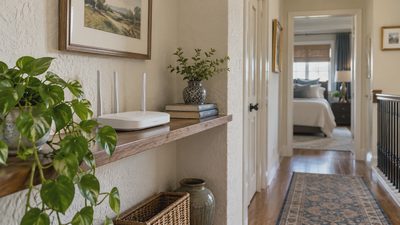
Also check the hub’s network connection. A wired Ethernet connection can reduce dependence on crowded 2.4 GHz Wi-Fi, though it does not fix poor Zigbee placement. Keep the hub away from a router, large metal equipment, and dense electrical panels when possible. A shelf several feet from the router is often a better starting point than hiding the hub inside a cabinet.
Installation: Pair Devices in the Right Order
Before pairing anything, update the hub and write down the device names you want to use. “Hall sensor” is more useful than a factory code six months later. Install fresh batteries in battery-powered devices, then reset each product according to its manual. Do not reset the entire system because one sensor is misbehaving; changing several variables at once makes diagnosis harder.
Place the Zigbee hub in a reasonably central location before adding distant devices. Pair a nearby powered device first, such as a smart plug or wall switch, because it may strengthen the mesh. Then add sensors room by room. After each device joins, test its real action from the location where it will live. A sensor that pairs on a workbench is not proven reliable until it reports from the garage, basement, or back door.
For in-wall switches, turn off power at the breaker and confirm the circuit is de-energized with an appropriate tester. Do not assume a wire is safe because a wall switch is off. If the box lacks a required neutral wire, the switch is incompatible with the installation, or you are uncertain about the wiring, stop and hire a licensed electrician. Wireless convenience is never worth an electrical injury or damaged wiring.
Fixing Common Connection Problems
When a device disappears, begin with the least dramatic explanation. Check the battery, confirm the device has power, and look for a recently moved hub, router, metal appliance, or electrical change. Many battery sensors sleep to conserve energy, so they may not respond instantly to a manual command. Trigger the sensor physically, wait briefly, and check its last reported activity.
If several devices fail at the same time, investigate the hub, network, or power supply before re-pairing individual products. Restarting a hub can clear a temporary fault, but repeated restarts suggest a deeper placement, interference, firmware, or compatibility issue. Move one device closer to the hub for testing. If it becomes reliable there, add a powered Zigbee repeater between the hub and the original location rather than buying a new sensor immediately.
A Zigbee hub can also become unreliable after a migration or firmware update if device names, automations, or routing information change. Take screenshots of important routines and export backups when your platform supports them. Test one automation at a time. A simple motion-to-light routine is a useful baseline before rebuilding a complicated scene involving schedules, door sensors, and voice assistants.

Privacy, Energy Use, and Long-Term Ownership
One reason homeowners choose Zigbee is that many ordinary sensor commands can remain local instead of traveling to a manufacturer’s cloud service. Local operation is not guaranteed by the word Zigbee alone; the hub and software determine what happens when the internet is unavailable. Test this by unplugging the internet connection briefly while leaving the local network active. Your critical light or leak alert should behave according to the platform’s documented capabilities.
Zigbee devices generally use little power, but a Zigbee hub still consumes electricity continuously. The amount is usually modest, yet a home with several bridges, cameras, speakers, and network boxes can accumulate unnecessary standby load. Consolidating compatible devices into one well-supported Zigbee hub can reduce clutter and maintenance, but replacing working bridges solely to chase a small energy saving may not pay back quickly.
Plan for failure before you need it. Keep a note of the hub model, coordinator firmware, device locations, and important automation rules. Store spare batteries for sensors and label the breaker serving smart switches. If the system becomes confusing, remove one variable: stop adding devices, restore a known backup, or test a single sensor near the hub. Repairing the existing setup is often cheaper than rebuilding an entire home around a new brand.
Is a Zigbee Hub Worth Buying?
A Zigbee hub makes sense when you want several low-power sensors, reliable lighting routines, or a mix of devices that would otherwise crowd your Wi-Fi. It is especially useful in a larger house where powered Zigbee devices can build a mesh across rooms. It is less attractive if you own only one smart plug, prefer a single-brand system, or do not want another app and network device to maintain.
Before purchasing, list your current products, identify your main control platform, and verify exact model compatibility. Then price the complete project: hub, repeater if needed, switches, batteries, and possible electrician labor. A $35 sensor is not a bargain if it requires a $120 bridge and still cannot trigger the routine you want. Likewise, a dependable hub can save money when it prevents repeated replacements and gives inexpensive sensors a stable home.
The best system is not the one with the most devices. It is the one that turns on the porch light, reports a leaking pipe, or tells you a door is open without demanding daily troubleshooting. Choose a Zigbee hub that matches your existing home, install it methodically, and test each automation under ordinary conditions. A smarter home should feel easier, not harder.