
A matter smart home is designed to make products from different manufacturers work together more easily. Instead of choosing every light, lock, plug, or thermostat from one brand, you can use compatible devices with Apple Home, Google Home, Amazon Alexa, Samsung SmartThings, or another supported platform. That sounds simple, but the real experience depends on your existing Wi-Fi, wiring, phone, and controller. A smarter home should feel easier, not harder, so the best approach is to plan around the home you already have.
What Matter actually does
Matter is a communication standard for smart-home devices. It gives manufacturers a shared way to describe and control supported products, which can reduce the compatibility problems that have frustrated homeowners for years. A Matter light bulb should not need to be limited to one ecosystem simply because of its brand. You still choose a platform for automations and voice control, but the Matter certification can make the device easier to add across supported platforms.
Matter does not replace every wireless technology. A device can use Wi-Fi, Ethernet, or Thread to connect, while Matter handles the common language between the device and your smart-home platform. Bluetooth is often used during setup. Zigbee and Z-Wave products can still work well, but they generally need a compatible hub or bridge to connect with a Matter smart home. Compatibility is therefore more than seeing the Matter logo on a box.
A Matter smart home also does not guarantee that every feature will appear in every app. Basic controls, such as turning a plug on or off, are usually the clearest use case. Advanced features, camera recordings, proprietary lighting scenes, and detailed energy reports may remain tied to the manufacturer's app or a particular ecosystem. Read the product specifications before assuming that one standard delivers every function everywhere.

Choose the controller before buying devices
The controller is the part of your system that manages Matter devices and automations. Depending on your platform, it may be a smart speaker, streaming device, hub, or dedicated home server. Apple Home can use supported HomePod or Apple TV hardware, Google Home uses compatible Nest and Google devices, and Alexa setups often rely on Echo equipment. SmartThings uses compatible hubs and apps, while Home Assistant can provide more advanced local control with the right hardware.
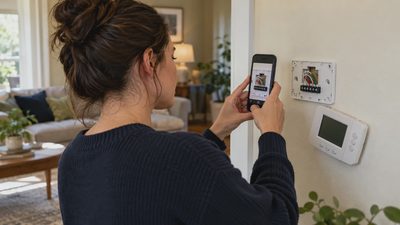
Before buying, identify which controller is already in your house. Check its model, software version, and whether it supports Matter and Thread if the product you want requires both. A Matter-over-Wi-Fi plug may work with a suitable controller without a Thread border router. A Thread sensor or door lock generally needs a controller that can communicate with Thread. These are separate questions, and product packaging does not always explain the difference clearly.
If you have no controller, start with the platform your household already uses. A family that regularly uses iPhones may find Apple Home convenient, while a home with several Echo speakers may prefer Alexa. Home Assistant offers more control and local processing, but setup and maintenance require more patience. There is no reward for building the most complicated system; choose the one everyone can operate when something needs attention.
Thread, Wi-Fi, and the network reality
Thread is a low-power mesh network intended for small devices such as sensors, buttons, and locks. It can improve battery life and reduce dependence on a crowded Wi-Fi network, but Thread devices still need a Thread border router to reach your smart-home controller. Several products can provide that router function, but they do not all behave identically after a firmware update or network change.
Wi-Fi devices are often easier to install because most homes already have a wireless network. They can consume more power, however, and inexpensive routers may struggle when many cameras, plugs, bulbs, and appliances are connected. Before blaming Matter smart home compatibility, test the basics: confirm the device has strong signal at its installation location, separate 2.4 GHz setup requirements from 5 GHz network names, and update the router firmware. A mesh system can help with coverage, but adding nodes will not fix a device with a defective radio or poor software.
Place a Thread border router in a central, open location rather than inside a metal cabinet or behind a television. Keep smart-home equipment away from obvious sources of interference when possible. Reliability matters more than a speed test in the room where your phone usually sits.

A sensible installation sequence
Start with one device, not six. Install the controller and confirm that its app can complete a basic automation. Next, update the device firmware while it is close to the router or hub. Scan the Matter setup code from the manufacturer's app or platform app, then assign a useful room name such as “upstairs hallway plug.” Avoid names such as “Matter device 4,” which become confusing once you add more products.
Test manual control from inside the house before building schedules. Turn a light on and off several times, unplug and restore power if the device permits it, and check whether the status remains accurate in the app. Then create one simple automation, such as turning a porch light on at sunset. Run it for several days before adding occupancy triggers, voice routines, or multiple conditions.
If pairing fails, do not immediately reset everything. Check power, move the device closer to the controller, confirm the setup code, and make sure another household member has not already added it. If the product was previously installed elsewhere, perform the manufacturer's documented factory reset. One change at a time makes the cause much easier to identify.
Privacy, energy, and everyday value
Matter can support local control, but privacy still depends on the platform and device manufacturer. Read whether an account is required, which information leaves the home, how long camera or usage data is retained, and whether two-factor authentication is available. A smart lock deserves stronger account protection than a decorative light. Use unique passwords and remove old household members from shared access.
Energy savings are possible, but the device does not create savings by itself. A smart thermostat can reduce unnecessary heating or cooling when schedules match your real routine. Smart plugs can reveal standby loads from entertainment equipment, although a plug that uses more electricity than it saves is not useful. Track your utility bill or plug-level consumption before and after a change instead of assuming an automation worked.
For example, a $25 smart plug that prevents a small entertainment setup from running overnight may be worthwhile for convenience and measurement, but it will not transform a high electric bill. Insulation, air sealing, efficient equipment, and sensible temperature settings usually matter more. Use connected products to support those habits.
When to buy, repair, or skip
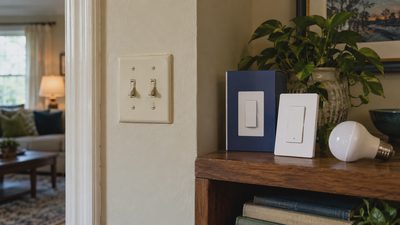
A new Matter smart home device makes sense when it solves a specific problem, such as a dead switch location, unreliable scheduling, or a missing door sensor. Before replacing an older product, replace its batteries, inspect the power adapter, update firmware, and test it near the controller. Some pairing failures come from weak batteries or a failing router rather than an obsolete standard.
Skip a product when its required hub costs more than the problem is worth, when its important features are locked to an ecosystem you do not use, or when the manufacturer has a poor update history. For hardwired switches, thermostats, and ceiling fixtures, turn off power at the breaker and follow the installation instructions. Stop and hire a licensed electrician if wiring is unfamiliar, the box lacks a neutral wire when one is required, or the circuit behavior is unclear.
The strongest matter smart home is not the one with the most devices. It is the home where lights respond, locks report accurately, and routines continue working after a weekend away. Start with one useful improvement, verify it for a week, and expand only when the stable-home test is passed. That method saves money, limits troubleshooting, and keeps smart technology in its proper role: making daily life simpler.